
Wise-USD
About this page2 migration checks
- Original wiki wording
- rev 3987 · 23 Apr 2025
- 2 migration checks
- Checked 8 Nov 2026
- Automated source comparison, not reviewed by a maintainer
Show checks
Added during migration, not part of the original. Each check identifies a specific difference or review need; none is a review of the whole procedure.
Bisq 1 payment references Checked against pinned source
Bisq 1 v1.10.11's rules say to leave the reason blank and not include the trade ID, Bitcoin, BTC or Bisq. Its UI guidance allows an account name or a non-descriptive character when a reference is compulsory and tells traders to discuss alternatives in trade chat. A method-specific old suggestion such as a SWIFT conversion comment is not a universal exception to those rules.
Checked 8 Nov 2026
Trade limits: restored macro values are historical Checked against pinned source
The restored templates contain 0.0624 BTC for MaxTradeSizeBisq1 and 0.50 BTC for MaxTradeSizeAltcoin. Bisq 1 v1.10.11 clamps trade limits to 0.25 BTC and calculates method limits from the DAO parameter and payment-method risk factor, with additional account restrictions. The historical macro values are not universal current limits; use the limit shown for the actual account and offer.
Checked 8 Nov 2026
Wise-USD (formerly TransferWise-USD) is a payment method available on Bisq, primarily for trading USD. It was added in Bisq v1.8.0.
Wise itself is a web- and app-based money transfer service supporting multiple currencies, allowing Wise-to-Wise transfers between users globally (see Wise payment method page, added in v1.5.4). However, due to specific US banking regulations and restrictions on USD transfers documented by Wise, a separate Wise-USD payment method is used within Bisq exclusively for USD trades.
Wise-USD Characteristics
Section titled “Wise-USD Characteristics”- Availability: Generally available to users with a Wise account who are permitted by Wise to send/receive USD according to Wise's policies. Users should consult Wise for specific eligibility.
- Currency: USD only.
- Fees: Wise itself may charge small fees for sending USD or for currency conversion if funding the payment from a non-USD balance. Users should check Wise's current fee schedule.
- Limits & Restrictions: While Bisq sets the BTC trade size limit (see below), Wise imposes its own sending/receiving limits and restrictions based on account verification, region, and other factors. Users must check their own Wise account limits and USD transfer eligibility before trading. See Wise help pages for details:
- Maximum Trade Duration: 4 days.
- Maximum BTC Limit (Bisq v1): .
- Account Signing Required: No.
Setup
Section titled “Setup”1. Set up Wise Account (External)
Section titled “1. Set up Wise Account (External)”You must first have an active account with Wise. Ensure your account is verified and eligible for sending/receiving USD payments according to Wise's terms and regional availability.
2. Add Wise-USD to Bisq
Section titled “2. Add Wise-USD to Bisq”Once your external Wise account is ready:
- Go to the Account tab in Bisq.
- Select National Currency Accounts.
- Click Add New Account.
- Select Wise-USD from the payment method dropdown list.
- Fill in the required details accurately (e.g., your registered Wise email address).
- (Optional) Add a custom Account Name visible only to you (e.g., "Wise-USD - John Doe") for easier management if you have multiple accounts.
- Click Save New Account.
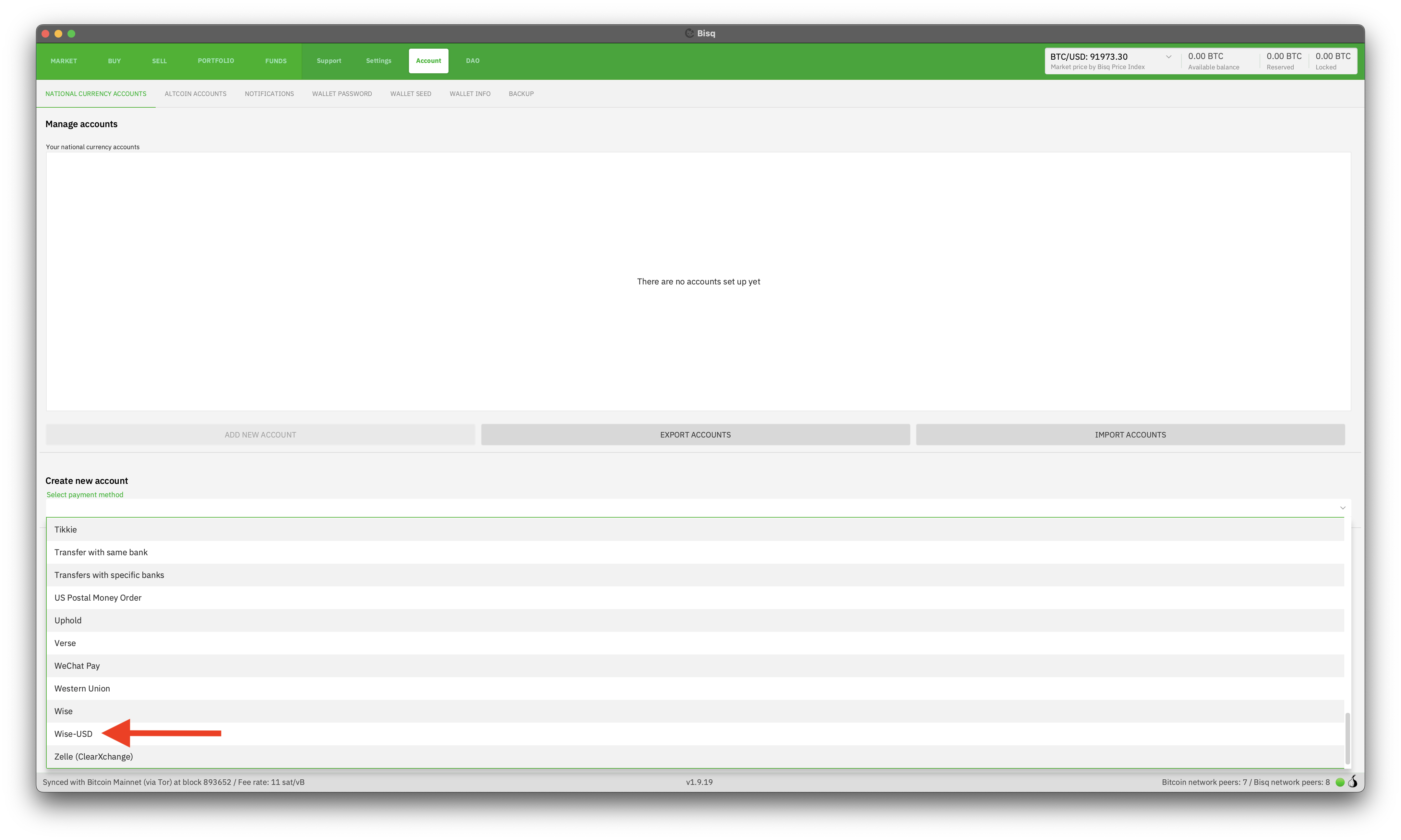
Historical full-size recovered source. Provenance catalogue.
Trading Process (Bisq v1)
Section titled “Trading Process (Bisq v1)”Buying BTC with Wise-USD
Section titled “Buying BTC with Wise-USD”Follow these steps carefully when buying BTC:
- Make or take an offer to buy BTC on the USD market using Wise-USD.
- Once the trade starts and the deposit confirms, view the seller's Wise-USD details (usually their registered email address) in the Bisq trade screen.
- Log in to your Wise account (app or website) and send the exact USD payment amount to the seller's details only as provided in Bisq.
- Important - Payment Reference: When sending via Wise, leave the payment reference/description field blank. If Wise requires an entry, use only your exact name as registered on your Wise account. Do not add any other text (e.g., "Bisq", "BTC", trade IDs, order details, etc.).
- After successfully sending the payment via Wise, click the Payment started button in Bisq.
Selling BTC with Wise-USD
Section titled “Selling BTC with Wise-USD”Follow these steps carefully when selling BTC:
- Make or take an offer to sell BTC on the USD market using Wise-USD.
- Once the trade starts and the deposit confirms, the buyer will see your Wise-USD details (from the account you added in Bisq).
- Wait for the buyer to send the payment via Wise and click "Payment started" in Bisq.
- Log in to your Wise account and verify you have received the correct USD amount.
- Verify Sender Name: Check that the payment came from a sender whose name exactly matches the BTC Buyer's name shown in the Bisq trade details.
- Once both the payment amount and sender name are verified correct, click Confirm payment receipt in Bisq to release the BTC.
Dispute Resolution
Section titled “Dispute Resolution”If a dispute arises (e.g., payment not received, wrong amount, sender name mismatch), follow the dispute resolution process.
Source and history
This article keeps its recovered wording, headings, step order and available images. Formatting and links are adapted for this site. The snapshot does not guarantee that every instruction is current.
- Original page
- Wise-USD
- Revision
- 3987 · 23 Apr 2025
- Last recorded editor
- Strayorigin (not a complete author list)
- Snapshot
- 18 October 2026
- Source files
- Original wikitext · Revision metadata
- Image references
- 1 recovered, 0 missing · Media catalogue
- Recovery gaps
- 1 restored historical template occurrences · 0 unresolved templates · 0 unresolved article links · 0 unresolved sections